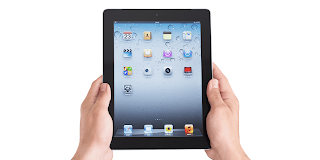
The Cost of iPad 2 - Updated 2023

The Cost of iPad 2
A Look Back at the iPad 2 - Once Apple's cutting-edge tablet

It’s hard to believe it has been over a decade since Apple first introduced the slim, sleek second iteration of the iPad. Launched in March 2011, the iPad 2 succeeded the original iPad with some significant upgrades and enhancements that had consumers excited. While tablets have advanced tremendously in the years since, let’s take a nostalgic look back at what was once Apple’s revolutionary iPad 2.  

At just 8.8mm thick and weighing just over 1 pound, the iPad 2 boasted both a thinner and lighter
design compared to the original iPad. This made the tablet lighter and more portable while still maintaining a roomy 9.7-inch display. The curved aluminum back fit comfortably in the user’s hands, proving Apple still valued form as well as function.

One key upgrade was the inclusion of front and rear cameras on the iPad 2 - a feature lacking from the first generation. While mediocre by today’s standards at just 0.7 megapixels, the rear camera allowed users to capture and share photos and 720p videos. Together with the front-facing VGA camera, the iPad 2 enabled video-calling with apps like FaceTime for the first time on an Apple tablet.  

Under the hood, the iPad 2 featured an updated Apple A5 processor whichdelivered double the RAM and up to 9 times faster graphics performance. This ensured snappier response times when launching and switching between apps. Powering all this was a battery that could last an impressive 10 hours per charge – a full workday of use without having to find a power outlet.

For connectivity, most cellular-enabled models utilized 3G technology, while some versions offered 4G LTE speeds. Wi-Fi models were also available for wireless connectivity. Users could enjoy bluetooth accessories like keyboards thanks to Bluetooth 2.1 support. A three axis gyro also improved motion sensing and control for games.  

With the introduction of the iPad 2 also came iOS 4, which brought multitasking capabilities that allowed seamless switching between apps. The iPad 2 launched with essential productivity apps like Pages word processor and access to popular games like Angry Birds. Optional accessories like the Smart Cover also debuted alongside the iPad 2, magnetically clipping to the side of the tablet to automatically wake it.

Pricing for the Wi-Fi only iPad 2 model started at $499 USD for 16GB storage, $599 for 32GB and maxed out at $699 for 64GB. Adding 4G LTE connectivity brought the cost closer to $629 starting price. These were logical prices at the time which made the iPad 2 accessible for everyday consumers and mobile workers.  

The thinner, faster and more powerful iPad 2 cemented Apple’s dominance in the tablet space. As one of the best-selling iPad models ever with over 15 million units sold, for a time it was the gold standard for tablets from 2011 through much of 2012. While tablets like the 4th generation iPad and iPad Air have since taken the helm with slimmer bezels and powerful performance, the beloved iPad 2 still holds nostalgia for many as their first Apple tablet.

Popular posts from this blog

Blogspot SEO

There are some tips to optimize your free blog hosted at Blogspot.com, you know as I know that a blog by Blogger.com is a very Good content generator that does very well with search engines especially with Google, Why Google? Because Blogspot.com is a daughter service provided by Google company. Here you go to SEO your Blogspot blog. 1. The title of your blog: You must make it only one word, yes this will help all your posts to avoid any conflicting between the post title and the main blog title. So, only one or approximately two words on the title. 2. External links: When you submit a new post, don't add an external link in the first paragraph, you can add that link after the third paragraph. 3. Write daily: Search engines like updatable blogs with daily fresh content, you can write a post per day for that issue. 4. Get links to your blog: This is the most important strategy for your blog, you should get high quality links to your blog from good websites. You can do it by submitti...

How to Make a Sitemap for Blogger

To help Google to index all your web pages in your blog, you should add sitemaps for your blogger blogs. To do that, just follow the following instructions. 1- Verify your blog: From your Google account go to - Webmaster Tools >> Add Site, type your blog URL in the "add site field". Then, you can verify it by choosing "Verify" button at the top. Choose "Meta Tag" option and add that meta tag to your blog template after the "Head" tag. 2- Add a sitemap: From your account, Choose "Sitemaps" and add a sitemap in this form: atom.xml?redirect=false&start-index=1&max-results=100 "If you wrote less than 100 posts" This is the atom feed of your blog, it was created automatically and every new post will be added automatically. Google crawl that sitemap everyday, so you don't need to submit the same sitemap again. You just need to submit new sitemap for the next 100 posts as following. Add another sitemap in this form:...

Submit Review Article

Welcome to Submit Review Article service by OGB, You can submit your articles here to get some very targeted traffic to your website. I guarantee you when you submit your unique article targeting a long tail keyword, your article will be in the first place in Google in just 24 hours. In this case and when you add a link to your website, you will receive very targeted traffic. Submission Guidelines: 1- The article must be unique and not published in any other website. 3- It must be in proper English spelling and grammar. 4- You can add one link to your website or landing page at the end of the article. No direct affiliate link, landing page included your affiliate link will sell better. Add your article in the comment box below this post, add your author name, your link and your Email. You will be notified by Emailwhen your article is published here. Don't Forget to Bookmark this Page

Free Adsense Templates

Good ready Adsense templates to add you Adsense codes in them, these templates are designed in the way which will maximize your Adsense revenue, it can even duplicate your revenue. These template are totally free, but you don't have the right to modify my link in the footer, otherwise, the template is yours. Edit it as you want, send it to friend, give it as a gift or a bonus with your own product. The position of Adsense ads within the body of your website is a vital thing for your Adsense business. I have tested tens of positions and colors and I have discovered the best positions to maximize your Adsense earnings by at least %50. Feel free to use this package for all your websites, feel free to send it to your friends. One thing I ask you, don't remove my link in the footer. Right click and save link as: Download the Package Now

Big Fish Affiliate Program

Big Fish Affiliate Program One of the most successful internet business plan, you will promote the thing that everyone is already doing all the time; you will promote the casual online games. Hope I clear something valuable for you. Full instructions to use this great affiliate program. 1. Go to Big Fish Games site and sign up. 2- Create an account, it's free to join. 3-After you complete installation process, login to your account. 4- Choose "My Games Space". 5- There, you will find your own online games website link, it will be something like this: http://www.mygamespace.com/UserName 6- By using this link, you can invite your friends and any other people who want to enjoy their time playing casual games and you will earn 25% of all their activities forever. It is very simple, send your link to all your friends to let them joining your team to play together. 7- To customize your online games website, go to "My Game Space" >> "Edit My Game Space...